Player 1
- Move
- ↑←↓→
- Build or break ice
- SpaceEnter
 Bad Ice Cream
Play Bad Ice Cream online in the game below, solo or with a friend on the same keyboard. Collect every fruit, dodge the monsters, and change the maze by building or breaking ice.
Use the arrow keys or WASD to move. Your ice action places a line of blocks in an open lane or breaks the ice in front of you. Click inside the game to give it keyboard focus.
Open the title menu and select Play. Choose 1 Player or 2 Players, pick your ice cream flavor, and select a level. If you share a keyboard, agree on keyboard sides first so neither person reaches across the other’s controls.
Click inside the game once so it receives your keyboard input. If only one character moves, return to the title menu and select 2 Players. Test the arrow keys and WASD separately, then test Space or Enter and F. If each set works alone but an action stops registering when both players hold keys, the keyboard may be dropping some combinations. Try tapping the ice key at a different moment or use another keyboard.
Assign one player the fruit in the immediate lane and the other the next safe pocket. Call out a wall before placing it across a shared route. If one player draws a patrol down the side of the maze, the other can use that opening to collect the fruit the patrol was guarding.
When the two routes meet, let the first player pass the intersection before the other changes the ice. In tight corridors, decide who will open the next wall and which side each player will retreat to. Leave the last fruit of a wave until both players know where they can move next.
Clear every fruit before the timer runs out while keeping away from the enemies. Stages can reveal a fresh batch of fruit after you collect the current one. Use the first few seconds to find a safe loop and notice where the patrols turn.
Face down an empty lane and press the ice key to put blocks between you and an approaching enemy. A wall buys more time when it blocks an intersection or closes the entrance to a fruit pocket. Leave at least one route back out before you finish the row.
Face an existing row and press the same key to clear the blocks ahead. Open one useful passage at a time. If you remove several walls at once, an enemy you were comfortably avoiding can reach the fruit from a different direction. Look across the lane before stepping through.
Sweep a cluster in one pass when the route is clear. Pick up an isolated fruit on the way back if reaching it means turning into a patrol. After you take the last piece in a group, quickly scan the whole board for the next batch and keep moving toward a safe junction.
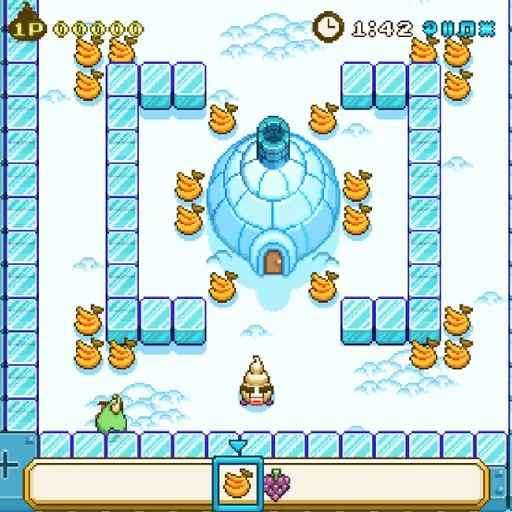
The opening stage has bananas, then grapes, and a single troll. Use the igloo in the screenshot as a landmark. From the starting position below it, follow the troll long enough to see which outer lane it takes. Sweep the bananas on the opposite side first. If the troll follows you toward a corner, break an inward row before you pick up the corner fruit so you have a second way out. When the grapes appear, scan both sides of the igloo before turning back. The opening you made for the bananas may give the troll a shortcut to the grapes.
The second stage adds more enemies. Collect the fruit nearest your open route first, then let the nearest patrol pass before you open a second aisle. If enemies approach from two sides, turn back through your earlier opening and circle around instead of racing them to the same corner.
Multiple cows make the open spaces harder to read. Watch the nearest crossing and the next one beyond it before committing. If a lane is busy, collect around its edge first and save the exposed pieces for the next pass. A clear side route is useful when the center fills up.
This stage introduces hot tiles. Use them as landmarks when planning a route between the grapes and watermelons. Pause at a safe junction, check where the cow is, and choose a path that gives you space to turn without crowding an enemy or a hot tile.
The duck and pineapples can fly. Clear the ordinary fruit along your loop first, then watch where the moving fruit returns to reach. Waiting in a safe square near its route can save more time than following it across the maze every time it moves away.
The browser links below open the separate Nitrome sequels. Finish the original first if you want to learn the ice action and enemy patterns with the opening set of stages.
The second entry gives returning players another set of fruit mazes and enemy encounters. Use the same shared-keyboard approach and check how the new enemies react when you change a lane.
Play Bad Ice Cream 2 on PokiThe third entry continues the local co-op puzzle format in a desert setting. Treat the first stage as a fresh map and learn its exits before splitting the fruit with your partner.
Play Bad Ice Cream 3 on PokiThe game loads at the top of this page. Click inside it and start from the title screen. If the player is unavailable, select Open on Poki below the game to use its browser edition.
Yes. Select 2 Players after choosing Play. One player uses the arrow keys and Space or Enter. The other uses WASD and F. Both players move in the same maze and can collect fruit and change the ice.
The original has 40 stages. Clear the fruit in the current stage to advance. More fruit can appear after you complete a group, so check the maze again before committing to a long route.
The embedded game and the Poki edition run in a current desktop browser without the old Flash browser plug-in. If one player is unavailable, try the other using the link below the game.
Use a physical keyboard for the controls shown here. If you are reading on a phone without a keyboard, the screenshot and walkthrough show how the ice and fruit mechanics work.
The same button handles both actions. Face a clear lane to create ice. Face a row of ice to break through it. Check the direction your character is facing before you press the button, especially after moving sideways.